SEGUIMIENTO A EGRESADOS - Centro de Bachillerato Tecnológico Agropecuario No. 146 -PÁGINA OFICIAL-
Menu Principal:
- Nuestro CBTA 146
- Oferta Educativa
- Depto. académico y competencias
- SAETA
- Act. Extracurriculares
- Certificación Microsoft
-
 Depto. de Vinculación
- Servicio Social
-
Servicios
- SERVICIOS ESCOLARES
- Depto Académico y Comp.
- Becas
- Materias
- ENLACES
- Ext. Camalú
SEGUIMIENTO A EGRESADOS

INDICACIONES GENERALES (DEBES LEER TODAS LAS INDICACIONES Y SEGUIR TODOS LOS PASOS, YA QUE SI NO SE CUMPLE CON LO SOLICITADO NO SE FIRMARA LA "HOJA DE FIRMAS" POR PARTE DEL DEPARTAMENTO DE VINCULACIÓN Y NO PODRÁS RECIBIR TU CERTIFICADO)
ENCUESTA SEGUIMIENTO A EGRESADOS
La encuesta de egresados en un cuestionario en donde se te pide información personal y la información necesaria que necesitamos para saber que camino tomarás al haber concluido tus estudios en nuestra institución.
Este proceso se compone de dos etapas, el primero es el cuestionario 1, el cual contestarás a continuación, y la encuesta 2 se te solicitará después de 6 meses para saber si has seguido estudiando o si ya tienes un empleo.
LA PRESENTE ENCUESTA VA DIRIGIDA PARA LOS ALUMNOS DE SEXTO SEMESTRE ESCOLARIZADO (CBTA 146 EJ. PADRE KINO) QUE EGRESARON RECIENTEMENTE Y QUE SON DE LA GENERACIÓN 2011-2014.
NOTA:
(LOS ALUMNOS EGRESADOS DE CAMALÚ TENDRÁN OTRA FECHA PARA CONTESTAR ESTA ENCUESTA QUE SERÁ PUBLICADA POSTERIORMENTE)
(LOS ALUMNOS EGRESADOS DE SAETA NO CONTESTARÁN NINGUNA ENCUESTA.
PASO 1
Verificar tu número de control y la contraseña que utilizarás. para verificar si estás en la lista da
CLIC AQUÍ
PASO 2
Ingresar a la página que te daremos al final de esta guía y dar clic en alumnos y egresados.
PASO 3
IIntroduce tu usuario (no de control) y contraseña.
PASO 4
Da clic en "cambiar mis datos".
PASO 5
Actualiza tu información correspondiente a domicilio (da clic encima de la palabra "domicilio" en la barra gris). los datos solicitados con un pequeño asterisco rojo deben ser obligatorios. Si ya estas radicando fuera del Valle de San Quintin (ej. ENSENADA, TIJUANA, ETC) pon tus datos actuales, es decir, tu nuevo domicilio.
PASO 6
Actualiza tu información correspondiente a los Datos de Contacto (da clic encima de la palabra "Datos de contacto" en la barra gris). Debes cambiar obligatoriamente tu correo electrónico, si dejas el mismo, no se te firmará la “hoja de Firmas”, ya que por medio de tu correo personal se le dará continuidad a las encuestas posteriores.
PASO 7
Una vez actualizada tu información deberás darle clic en Aceptar donde te aparecerá un mensaje con la leyenda "Se ha actualizado la información correctamente", en caso que no te aparezca esta leyenda significa que te faltó llenar algún campo, o la información que pusiste en algun otro esta incorrecta, deberás regresar a los menús de DOMICILIO Y DATOS DE CONTACTO para revisar la información que proporcionaste, recuerda que los campos con un asterisco son obligatorios.
PASO 8
Una vez actualizada tu información personal deberás contestar el CUESTIONARIO 1, por lo que debes seleccionarlo y darle clic en "VER ENCUESTA".
PASO 9
te pedimos que ahora contestes las preguntas que se te indican, de acuerdo a tu situación posterior al egreso de nuestra institución.
PASO 10
Al terminar de contestar la encuesta deberás dar clic en ENVIAR y GUARDAR, como se muestra en las siguientes imagenes, para que tu encuesta pueda ser guardada exitosamente.

Cuando le hayas dado clic en guardar te aparecerá un mensaje con el texto "la encuesta ha sido guardada de forma exitosa, gracias" lo que indica que tu encuesta fue enviada y guardada exitosamente.
PASO 11
Al haber concluido los pasos anteriores ya puedes cerrar sesión, como consejo te recomendamos cambiar tu contraseña para que nadie pueda acceder en tu lugar, solo recuerda que debe ser una contraseña ya conocida en tus otras cuentas (correo, facebook, etc) ya que si pones una nueva contraseña muy probablemente se te olvidará, por eso te recomendamos usar una ya conocida y no inventar una nueva.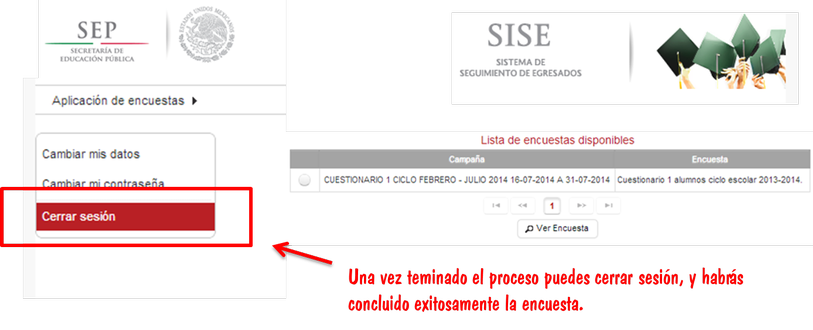
______________________________________________________________
El enlace para contestar la encuesta y seguir todos los pasos indicados ateriormente es el siguiente:
http://sise.sep.gob.mx/sise/
______________________________________________________________
SI TUVISTE ALGÚN PROBLEMA PUEDES DEJAR TU MENSAJE AQUI:
Ledger Live Login|
Ledger Live Login|
Ledger Live Login|
Ledger Live Login|
Ledger Live Login|
Ledger Live Login|
Ledger Live Login|
Ledger Live Login|
Ledger Live Login|
Ledger Live Support|
Ledger Live Support|
Ledger Live Support|
Ledger Live Support|
Ledger Live Support|
Ledger Live Support|
Ledger Live Support|
Ledger Live Support|
Ledger Live Support|
Ledger Live Support|
Ledger Nano X Not Charging|
Ledger Nano X Not Charging|
Ledger Nano X Not Charging|
Ledger Nano X Not Charging|
Ledger Nano X Not Charging|
Ledger Nano X Not Charging|
Ledger Nano X Not Charging|
Ledger Nano X Not Charging|
Ledger Nano X Not Charging|
Ledger Nano X Not Charging|
Ledger Nano X Screen Not Working|
Ledger Nano X Screen Not Working|
Ledger Nano X Screen Not Working|
Ledger Nano X Screen Not Working|
Ledger Nano X Screen Not Working|
Ledger Nano X Screen Not Working|
Ledger Nano X Screen Not Working|
Ledger Nano X Screen Not Working|
Ledger Nano X Screen Not Working|
Ledger Nano X Screen Not Working|
Ledger Nano X Battery Issue|
Ledger Nano X Battery Issue|
Ledger Nano X Battery Issue|
Ledger Nano X Battery Issue|
Ledger Nano X Battery Issue|
Ledger Nano X Battery Issue|
Ledger Nano X Battery Issue|
Ledger Nano X Battery Issue|
Ledger Nano X Battery Issue|
Ledger Nano X Battery Issue|
Trezor.io/start|
Trezor.io/start|
Trezor.io/start|
Trezor.io/start|
Trezor.io/start|
Trezor.io/start|
Trezor.io/start|
Trezor.io/start|
Trezor.io/start|
Trezor.io/start|
Trezor device not connecting|
Trezor device not connecting|
Trezor device not connecting|
Trezor device not connecting|
Trezor device not connecting|
Trezor device not connecting|
Trezor device not connecting|
Trezor device not connecting|
Trezor device not connecting|
Trezor device not connecting|
Trezor display not working|
Trezor display not working|
Trezor display not working|
Trezor display not working|
Trezor display not working|
Trezor display not working|
Trezor display not working|
Trezor display not working|
Trezor display not working|
Trezor display not working|
Trezor firmware update issue|
Trezor firmware update issue|
Trezor firmware update issue|
Trezor firmware update issue|
Trezor firmware update issue|
Trezor firmware update issue|
Trezor firmware update issue|
Trezor firmware update issue|
Trezor firmware update issue|
Trezor firmware update issue|
Trezor Suite not showing balance|
Trezor Suite not showing balance|
Trezor Suite not showing balance|
Trezor Suite not showing balance|
Trezor Suite not showing balance|
Trezor Suite not showing balance|
Trezor Suite not showing balance|
Trezor Suite not showing balance|
Trezor Suite not showing balance|
Trezor Suite not showing balance|
Trezor Suite|
Trezor Suite|
Trezor Suite|
Trezor Suite|
Trezor Suite|
Trezor Suite|
Trezor Suite|
Trezor Suite|
Trezor Suite|
Trezor Suite|
Trezor Bridge|
Trezor Bridge|
Trezor Bridge|
Trezor Bridge|
Trezor Bridge|
Trezor Bridge|
Trezor Bridge|
Trezor Bridge|
Trezor Bridge|
Trezor Bridge|
Trezor hardware login|
Trezor hardware login|
Trezor hardware login|
Trezor hardware login|
Trezor hardware login|
Trezor hardware login|
Trezor hardware login|
Trezor hardware login|
Trezor hardware login|
Trezor hardware login|
Ledger Nano X Not Charging|
Ledger Nano X Not Charging|
Ledger Nano X Screen Not Working|
Ledger Nano X Screen Not Working|
Ledger Nano X Screen Not Working|
Ledger Nano X Battery Issue|
Ledger Nano X Battery Issue|
Ledger Nano X Battery Issue|
Trezor.io/start|
Trezor.io/start|
Trezor.io/start|
Trezor.io/start|
Trezor.io/start|
Trezor.io/start|
Trezor.io/start|
Trezor.io/start|
Trezor.io/start|
Trezor.io/start|
Trezor Bridge|
Trezor Bridge|
Trezor Bridge|
Trezor Bridge|
Trezor Bridge|
Trezor Bridge|
Trezor Bridge|
Trezor Bridge|
Trezor Bridge|
Trezor Bridge|
Trezor device not connecting|
Trezor device not connecting|
Trezor device not connecting|
Trezor device not connecting|
Trezor device not connecting|
Trezor device not connecting|
Trezor device not connecting|
Trezor device not connecting|
Trezor device not connecting|
Trezor device not connecting|
Trezor display not working|
Trezor display not working|
Trezor display not working|
Trezor display not working|
Trezor display not working|
Trezor display not working|
Trezor display not working|
Trezor display not working|
Trezor display not working|
Trezor display not working|
Trezor firmware update issue|
Trezor firmware update issue|
Trezor firmware update issue|
Trezor firmware update issue|
Trezor firmware update issue|
Trezor firmware update issue|
Trezor firmware update issue|
Trezor firmware update issue|
Trezor firmware update issue|
Trezor firmware update issue|
Trezor Suite not showing balance|
Trezor Suite not showing balance|
Trezor Suite not showing balance|
Trezor Suite not showing balance|
Trezor Suite not showing balance|
Trezor Suite not showing balance|
Trezor Suite not showing balance|
Trezor Suite not showing balance|
Trezor Suite not showing balance|
Trezor Suite not showing balance|
Ledger Live Login|
Ledger Live Login|
Ledger Live Login|
Ledger Live Login|
Ledger Live Login|
Ledger Live Login|
Ledger Live Login|
Ledger Live Login|
Ledger Live Login|
Ledger Live Login|
Ledger Live Support|
Ledger Live Support|
Ledger Live Support|
Ledger Live Support|
Ledger Live Support|
Ledger Live Support|
Ledger Live Support|
Ledger Live Support|
Ledger Live Support|
Ledger Live Support|
Ledger Nano X Not Charging|
Ledger Nano X Not Charging|
Ledger Nano X Screen Not Working|
Ledger Nano X Screen Not Working|
Ledger Nano X Screen Not Working|
Ledger Nano X Battery Issue|
Ledger Nano X Battery Issue|
Ledger Nano X Battery Issue|
Trezor.io/start|
Trezor.io/start|
Trezor.io/start|
Trezor.io/start|
Trezor.io/start|
Trezor.io/start|
Trezor.io/start|
Trezor.io/start|
Trezor.io/start|
Trezor.io/start|
Trezor Bridge|
Trezor Bridge|
Trezor Bridge|
Trezor Bridge|
Trezor Bridge|
Trezor Bridge|
Trezor Bridge|
Trezor Bridge|
Trezor Bridge|
Trezor Bridge|
Trezor device not connecting|
Trezor device not connecting|
Trezor device not connecting|
Trezor device not connecting|
Trezor device not connecting|
Trezor device not connecting|
Trezor device not connecting|
Trezor device not connecting|
Trezor device not connecting|
Trezor device not connecting|
Trezor display not working|
Trezor display not working|
Trezor display not working|
Trezor display not working|
Trezor display not working|
Trezor display not working|
Trezor display not working|
Trezor display not working|
Trezor display not working|
Trezor display not working|
Trezor firmware update issue|
Trezor firmware update issue|
Trezor firmware update issue|
Trezor firmware update issue|
Trezor firmware update issue|
Trezor firmware update issue|
Trezor firmware update issue|
Trezor firmware update issue|
Trezor firmware update issue|
Trezor firmware update issue|
Trezor Suite not showing balance|
Trezor Suite not showing balance|
Trezor Suite not showing balance|
Trezor Suite not showing balance|
Trezor Suite not showing balance|
Trezor Suite not showing balance|
Trezor Suite not showing balance|
Trezor Suite not showing balance|
Trezor Suite not showing balance|
Trezor Suite not showing balance|
Ledger Live Login|
Ledger Live Login|
Ledger Live Login|
Ledger Live Login|
Ledger Live Login|
Ledger Live Login|
Ledger Live Login|
Ledger Live Login|
Ledger Live Login|
Ledger Live Login|
Ledger Live Support|
Ledger Live Support|
Ledger Live Support|
Ledger Live Support|
Ledger Live Support|
Ledger Live Support|
Ledger Live Support|
Ledger Live Support|
Ledger Live Support|
Ledger Live Support|
Netcoins Login | Netcoins Login | Netcoins Login | Netcoins Login | Netcoins Login | Netcoins Login | Netcoins Login | Netcoins Login | Netcoins Login | Netcoins Login | Bitbuy Login | Bitbuy Login | Bitbuy Login | Bitbuy Login | Bitbuy Login | Bitbuy Login | Bitbuy Login | Bitbuy Login | Bitbuy Login | Bitbuy Login
Kraken Pro Login |
Trezor.io/start |
Trezor.io/start |
Trezor Bridge |
Trezor Bridge |
Trezor Hardware Wallet |
Trezor Hardware Wallet |
Trezor Login |
Trezor Login |
Trust Wallet App |
Trust Wallet App |
uphold login |
uphold login |
uphold login |
uphold login |
uphold login |
uphold login |
uphold login |
uphold login |
ledger live login |
ledger live login |
ledger live login |
ledger live login |
ledger live login |
ledger live login |
Ndax Login |
Ndax Login |
Ndax Login |
Ndax Login |
Trezor.io/start|
Trezor.io/start|
Trezor.io/start|
Trezor.io/start|
Trezor.io/start|
Trezor.io/start|
Trezor.io/start|
Trezor.io/start|
Trezor.io/start|
Trezor Bridge|
Trezor Bridge|
Trezor Bridge|
Trezor Bridge|
Trezor Bridge|
Trezor Bridge|
Trezor Bridge|
Trezor Bridge|
Trezor Bridge|
Trezor Bridge|
Trezor device not connecting|
Trezor device not connecting|
Trezor device not connecting|
Trezor device not connecting|
Trezor device not connecting|
Trezor device not connecting|
Trezor device not connecting|
Trezor device not connecting|
Trezor device not connecting|
Trezor device not connecting|
Trezor display not working|
Trezor display not working|
Trezor display not working|
Trezor display not working|
Trezor display not working|
Trezor display not working|
Trezor display not working|
Trezor display not working|
Trezor display not working|
Trezor display not working|
Trezor firmware update issue|
Trezor firmware update issue|
Trezor firmware update issue|
Trezor firmware update issue|
Trezor firmware update issue|
Trezor firmware update issue|
Trezor firmware update issue|
Trezor firmware update issue|
Trezor firmware update issue|
Trezor firmware update issue|
Trezor Suite not showing balance|
Trezor Suite not showing balance|
Trezor Suite not showing balance|
Trezor Suite not showing balance|
Trezor Suite not showing balance|
Trezor Suite not showing balance|
Trezor Suite not showing balance|
Trezor Suite not showing balance|
Trezor Suite not showing balance|
Trezor Suite not showing balance|
Ledger Live Login|
Ledger Live Login|
Ledger Live Login|
Ledger Live Login|
Ledger Live Login|
Ledger Live Login|
Ledger Live Login|
Ledger Live Login|
Ledger Live Login|
Ledger Live Login|
Ledger Live Support|
Ledger Live Support|
Ledger Live Support|
Ledger Live Support|
Ledger Live Support|
Ledger Live Support|
Ledger Live Support|
Ledger Live Support|
Ledger Live Support|
Ledger Live Support|
starbucks gift card balance
Netcoins Login | Netcoins Login | Netcoins Login | Netcoins Login | Netcoins Login | Netcoins Login | Netcoins Login | Netcoins Login | Netcoins Login | Netcoins Login | Bitbuy Login | Bitbuy Login | Bitbuy Login | Bitbuy Login | Bitbuy Login | Bitbuy Login | Bitbuy Login | Bitbuy Login | Bitbuy Login | Bitbuy Login